Neale Pickett
·
2023-10-24
advanced-install.md
1# Advanced Install
2
3In the Arduino IDE, edit [vail-adapter.ino](../vail-adapter.ino) with the pins
4you want to use on your device.
5
6You will need the MidiUSB and Keyboard libraries installed.
7You can do this through the Library manager.
8
9Then compile and upload the sketch.
10
11
12## Works with no source code changes
13
14* Seeeduino Xiao SAMD21
15* Adafruit Qt Py SAMD21
16
17## Known to work with source code changes
18
19* Arduino Micro
20* KeeYees Pro Micro
21* Arduino Leonardo
22* Arduino Zero
23* Adafruit Trinket M0
24* Adafruit GEMMA M0
25* Adafruit Feather M0
26
27## Will Not Work!
28
29The RP2040 chip will not work, because it lacks a USB MCU,
30needed by the MIDIUSB library.
31I'm listing specific devices here
32in the hopes that seeing them crossed out will prevent people from
33making a purchasing mistake!
34
35* ~~Seeeduino Xiao RP2040~~ Will not work!
36* ~~Adafruit Qt Pi RP2040~~ Will not work!
37* ~~Any RP2040 Device~~ Will not work!
38
39
40# Advanced Wiring
41
42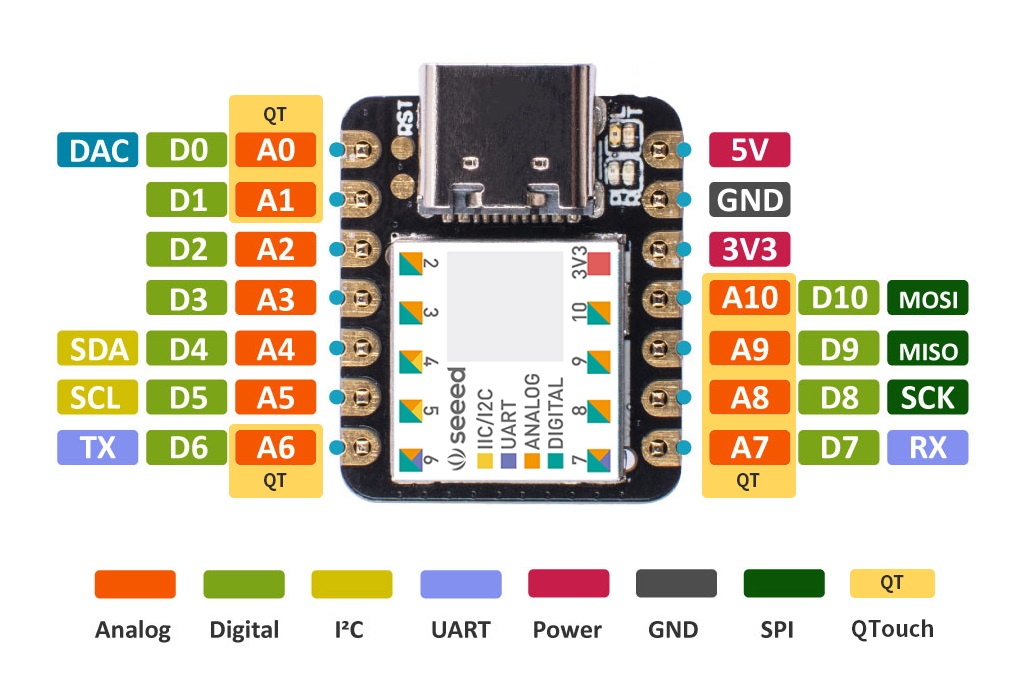
43
44* GND: Ground
45* D2: Dit
46* D1: Dah
47* D0: Straight Key
48* D10: Speaker or Passive piezo buzzer
49* A6: Capacative Dit
50* A7: Capacative Dah
51* A8: Capacative Straight Key
52
53
54## Using a headphone jack
55
56You can wire a headphone jack up to GND, D1, and D2.
57GND should be the sleeve, D1 the ring, and D2 the tip.
58
59 o --- D2 (tip, dit)
60 |_| --- D1 (ring, dah)
61 | | --- GND (sleeve)
62 | |
63
64## Sidetone generator
65
66If you connect a buzzer or speaker to pin 10 on one leg,
67and ground on the other,
68the adapter will beep when you press the straight key.
69
70This will help a lot if there is a noticeable delay between when you press the key
71and when your computer starts making a local beeping sound.
72
73If you feel like no matter what you do,
74you're always getting DAH with your straight key,
75you should try this.
76
77
78## Capacative Touch
79
80The adapter works as a capacative touch sensor,
81like a touch lamp.
82
83You might wire these pins to screws or conductive pads.
84These can be used instead of, or in additon to, the normal pins D0, D1, and D2.
85
86You do not need a ground wire with capacative touch!
87
88* Pin A6: Dit capacative touch
89* Pin A7: Dah capacative touch
90* Pin A8: Straight key capacative touch